01When do you need recurring invoices?
Whenever you regularly invoice the same service to the same client, a recurring template pays off. Typical use cases:
- Coaching packages with a monthly flat rate
- IT maintenance contracts and hosting
- Consulting retainers (e.g. 10 hours/month)
- Subscription models and ongoing services
- Rental income from subletting
The problem: creating the same invoice from scratch every month — selecting the client, entering line items, checking VAT, sending. It takes a few minutes each time and is a source of errors. With recurring invoices in einzly, you set up the template once. After that, a new draft is automatically created every month — with the same line items, the same VAT, and the same payment terms.
02How to create a recurring invoice
Step 1 — Create an invoice as usual
You create a standard invoice: select the client, add line items, set the VAT type and payment terms. Everything works just like a regular invoice — you can also use the QR invoice as usual.
Step 2 — Activate the checkbox
Below the line items, you'll find the option "Recurring Invoice (monthly)". Activate the checkbox — done. This feature is only available for standard invoices, not for partial or final invoices.
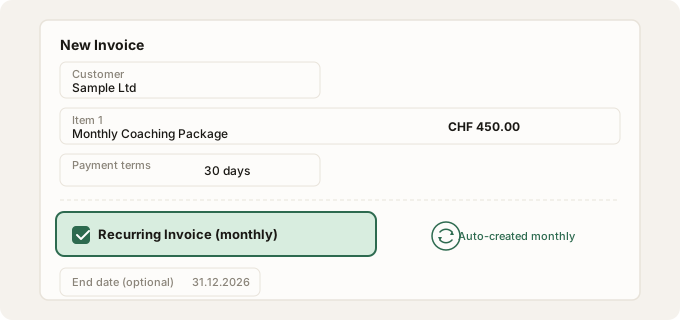
Step 3 — Set an end date (optional)
You can set an end date after which no new drafts will be created. If you leave the field empty, the template runs indefinitely — you can stop it manually at any time.
03What happens every month?
Every month, einzly automatically creates a new invoice draft based on your template. Here's what happens:
- A new draft is created — with the same line items, amounts, and VAT type
- A new invoice number is automatically assigned
- The due date is calculated based on the configured payment terms
- The draft gets an "Auto" badge so you can identify it immediately
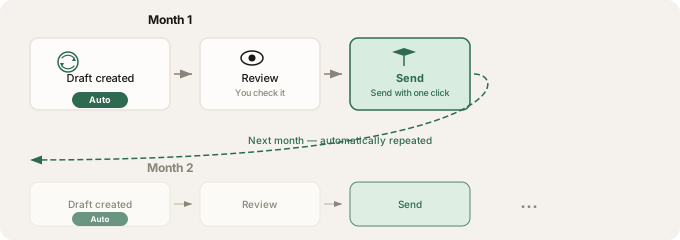
This cycle repeats every month. You can adjust the draft before sending at any time — for example, change a line item or add a note. Only when you click "Send" does your client receive the invoice. Learn how sending works in our article on sending invoices directly.
04Overview and management
All recurring invoices are displayed in a dedicated section of the invoice dashboard — with a cycle icon so you can spot them immediately. At a glance, you can see:
- Client name and interval (monthly)
- Number of invoices already generated
- Status: active, stopped, or expired
- Next creation date
You can stop any template at any time (no more new drafts), reactivate it, or delete it entirely. Already created invoices are always preserved — stopping or deleting only affects future drafts.
05Who is this for?
Recurring invoices are suitable for all self-employed professionals who regularly invoice the same amount to the same client. Here are some examples:
- Coaches with monthly coaching packages or group subscriptions
- IT service providers with maintenance contracts, hosting, or SLA packages
- Consultants with retainer models (e.g. 10h/month)
- Landlords with monthly rental income from subletting
- Subscription-based services like cleaning, gardening, or bookkeeping
- Freelancers with fixed mandates and consistent scope
If you also create quotes for larger projects, you can use recurring invoices as a complement for your ongoing mandates.