01Why terms & conditions matter for the self-employed
As a self-employed professional, your terms and conditions set the rules for your business relationships. Payment deadlines, liability limitations, cancellation policies — all of this belongs in a clearly worded document. Without T&C, you're often at a disadvantage in disputes.
The problem: many forget to include their T&C, or manually attach them to every email. This takes time and is error-prone. Even better: your T&C are legally up to date and automatically linked — that's exactly what einzly does.
02How the T&C upload works in einzly
In two steps, your T&C are set up and automatically sent with every invoice:
Step 1: Upload T&C as PDF
Open the settings in einzly and navigate to the "Terms & Conditions" section. There you can upload your T&C document as a PDF. The maximum file size is 5 MB — more than enough for a typical T&C document.
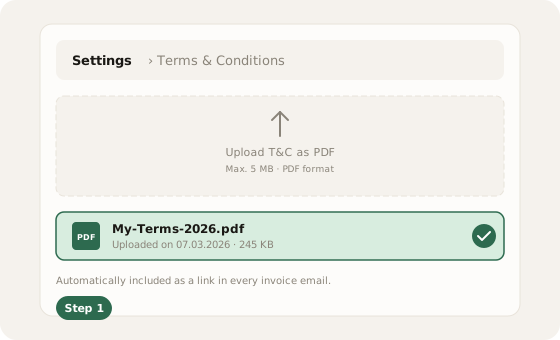
You can update your T&C at any time by uploading a new version. The old file is automatically replaced.
Step 2: Automatic link in every email
Once you've uploaded your T&C, einzly automatically adds a download link in the footer of every invoice email. Your client can download the T&C with one click — you don't need to attach anything manually.
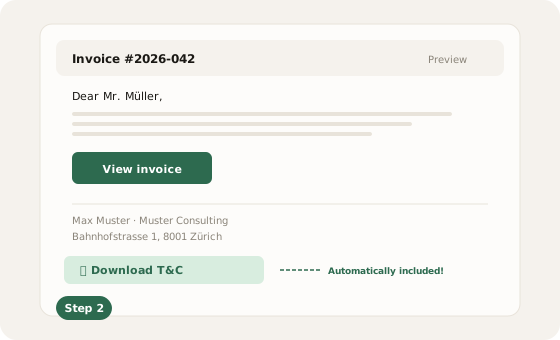
This also works with email sending with custom branding. Logo, accent colour, and T&C link — all consistent and professional.
Also in the onboarding wizard
When you set up einzly for the first time, the onboarding wizard asks whether you'd like to upload T&C. This way you won't forget and start professionally — from the very first invoice you send.
03What to include in your T&C
Scope of services: What exactly you deliver and what not — especially important for service providers.
Liability: Liability limitations and exclusions, as far as legally permitted.
Cancellation: Under what conditions can an order be cancelled? Are there cancellation fees?
Jurisdiction: Which court and which law applies in case of disputes?