01Why a Receipt Scanner?
Recording expenses is one of the least popular tasks in accounting. Not because it's complicated — but because it's repetitive. Type the supplier, enter the amount, look up the date, select a category. For every single receipt.
It adds up: 20 receipts per month, 1–2 minutes each — that's half an hour of typing. Per month. And mistakes happen: wrong amount, wrong date, wrong category.
02How the AI Receipt Scanner Works
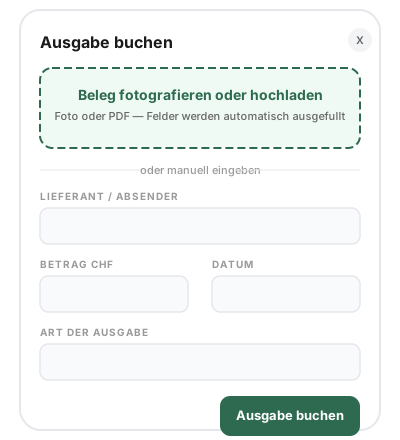
When you record a new expense, you'll see an upload area at the top of the form. Upload your receipt there — as a photo (taken directly with your phone) or as a PDF. The rest happens automatically.
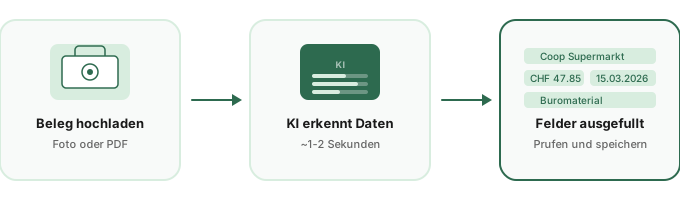
Open 'New Expense' and click on the scan area at the top of the form. You can take a photo (the camera opens directly on mobile) or select a file — images and PDFs are supported.
Within 1–2 seconds, the AI analyzes your receipt and extracts: supplier/company name, total amount, receipt date, matching expense category, VAT rate (if relevant), and a short booking text.
All fields in the form are now pre-filled. You quickly check if everything is correct, adjust if needed, and press 'Book Expense'. The receipt is simultaneously attached as a file.
03What Gets Recognized?
The AI analyzes the entire receipt and extracts all relevant information for your accounting:
| Field | Example | Recognition |
|---|---|---|
| Supplier | Coop, Swisscom, SBB | Company name from receipt |
| Amount | CHF 47.85 | Total amount (gross) |
| Date | 15.03.2026 | Receipt date |
| Category | Office supplies, Vehicle | Intelligently assigned |
| VAT Rate | 8.1%, 2.6%, 3.8% | Only with effective method |
| Booking Text | Office supplies Coop | Short description |
Intelligent Category Assignment
The AI automatically assigns expenses to the correct category — based on the receipt content. A gas station receipt is recognized as 'Vehicle/Fuel', an SBB ticket as 'Travel Expenses', Google Ads as 'Marketing'. There are clear assignment rules for all 16 expense categories in einzly.
Even better: einzly remembers which category you use for which supplier. The second receipt from the same supplier automatically gets the same category — without AI, directly from your usage patterns. The system learns over time.
04VAT Recognition: Only When Relevant
The AI receipt scanner automatically adapts to your VAT settings:
| Your VAT Status | VAT from Receipt? | Why? |
|---|---|---|
| No VAT | No | Not VAT-registered, no input tax deduction |
| Flat Rate | No | Flat rate, no input tax deduction |
| Effective Method | Yes | Input tax is deducted — VAT rate relevant |
Only with the effective method does the VAT rate need to be captured from the receipt — for the input tax deduction. With all other methods, the field is automatically skipped. No unnecessary data is collected.
05Which Receipts Work?
The scanner works with virtually all receipt types common in Switzerland:
- Cash register receipts — Coop, Migros, Denner, Aldi and all other retailers
- Online invoices as PDF — Swisscom, Sunrise, Hostpoint, Google, Adobe
- Gas station receipts — Shell, BP, Avia, Migrol and all fuel stations
- Restaurant receipts — Entertainment receipts including tips
- SBB and travel receipts — Train tickets, flight tickets, hotel invoices
- Tradesperson invoices — Repairs, materials, services
- Subscriptions and licenses — Software invoices, cloud services
06Privacy and Security
The AI receipt scanner processes your data in a GDPR-compliant manner. Receipts are sent to the AI service exclusively for text recognition — not stored, not used for training, not shared with third parties.
- Receipts are processed only for one-time recognition
- No storage of image data by the AI provider
- No use of your data for AI training
- Encrypted transmission (TLS/HTTPS)
- Your original receipt remains safely stored in your einzly account
The data on your receipts — amounts, suppliers, purchases — is not particularly sensitive personal data under Swiss data protection law. These are ordinary business expenses, comparable to what every cloud accounting tool processes daily.