HomeBlogeinzly Features
einzly Features

Create invoices in foreign currencies with einzly — EUR, USD, GBP

International clients, international invoices. Whether you bill a client in Germany in euros or charge for a project in the US in dollars — einzly supports CHF, EUR, USD, and GBP. In this article, we show you step by step how to create invoices in foreign currencies and record the exchange rate upon payment.

e
einzly Redaktion
Tax & Finance Editorial · einzly
5 min read
7 Mar 2026
Related topics
Foreign currencyeinzlyInvoicing

01International clients, flexible currencies

As a self-employed professional in Switzerland, you may have clients abroad. Whether design projects for German agencies, consulting for British firms, or translations for US companies — invoicing in the client's currency is professional and avoids confusion.

einzly supports four currencies: CHF, EUR, USD, and GBP. The currency is chosen per invoice — so you can invoice clients in different currencies at the same time.


02How it works — 3 steps to a foreign currency invoice

Step 1: Client with a foreign address

When you add a client with a foreign address, einzly automatically detects the country and suggests the appropriate currency. For a German client, EUR is suggested; for a British client, GBP.
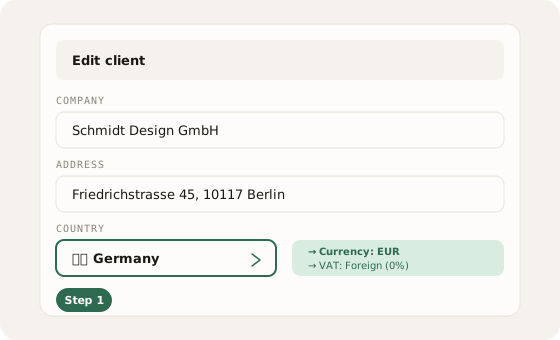
einzly client form with German address: country dropdown shows Germany, automatically detected currency EUR and VAT Foreign 0%
einzly detects the country and automatically suggests currency + VAT

At the same time, the VAT rate is automatically set to "Foreign" — i.e. 0%. Because services to clients abroad are generally not subject to Swiss VAT. More on this in our article on VAT filing with the FTA.

Step 2: Currency on the invoice

On the invoice itself, you can adjust the currency at any time via a dropdown. The suggested currency is based on the client's country, but you can change it manually — for example, if a German client wants to pay in CHF.
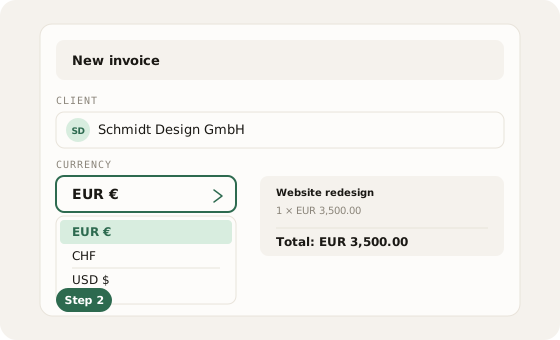
einzly invoice form with open currency dropdown: EUR selected, CHF, USD, and GBP as alternatives
Choose the currency per invoice — EUR, CHF, USD, or GBP

All amounts on the invoice — line items, subtotal, VAT, and total — are displayed in the chosen currency.

Step 3: Paid — record the CHF amount

When the invoice is paid, you enter the actual CHF amount received. Because the amount arrives in CHF in your Swiss bank account — at the bank's daily exchange rate. einzly shows you the approximate exchange rate as a guide.
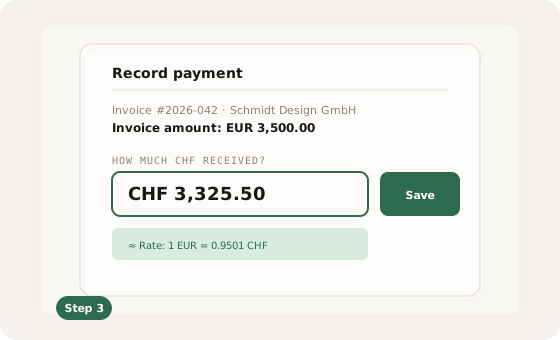
einzly payment modal: invoice amount EUR 3,500.00, input field for received CHF amount with exchange rate display
Record the actual CHF amount received upon payment

This keeps your accounting clean: the invoice shows the amount in the client's currency, and the income is correctly recorded in CHF.


03VAT for foreign clients

Automatically 0% VATWhen you invoice clients abroad, Swiss VAT generally does not apply. einzly automatically sets the VAT rate for foreign clients to "Foreign" (0%). In the VAT return, these revenues are reported separately as "services abroad".

04QR invoice only for CHF

No QR code for foreign currenciesThe Swiss QR payment part is only generated for invoices in CHF. For invoices in EUR, USD, or GBP, no QR code appears, as the Swiss QR standard only supports CHF. In this case, your client pays via bank transfer to your account.


05Frequently asked questions

einzly supports four currencies: CHF (Swiss Franc), EUR (Euro), USD (US Dollar), and GBP (British Pound). The currency is chosen per invoice.
einzly shows you an approximate exchange rate as a guide. However, you enter the actual CHF amount manually, as your bank's effective rate is what matters.
No. You can create invoices in any supported currency, even if you only have a CHF account. Your client transfers in the foreign currency, and your bank converts the amount to CHF.
The difference between the invoiced amount (converted at the daily rate) and the actual CHF amount received is an exchange rate difference. This is automatically accounted for in einzly's bookkeeping.
Share